Car Assist

OBD-II · iPhone · AI diagnosis

Find out what's wrong with your car.

Plug an OBD-II adapter into your car and open Car Assist. It reads the fault codes, live data and every control unit it can reach, and its assistant works out the likely cause with you, then tells you how to fix it.

See how it works Coming soon to theApp Store

For iPhone. Works with any ELM327 adapter on Bluetooth LE or Wi-Fi.

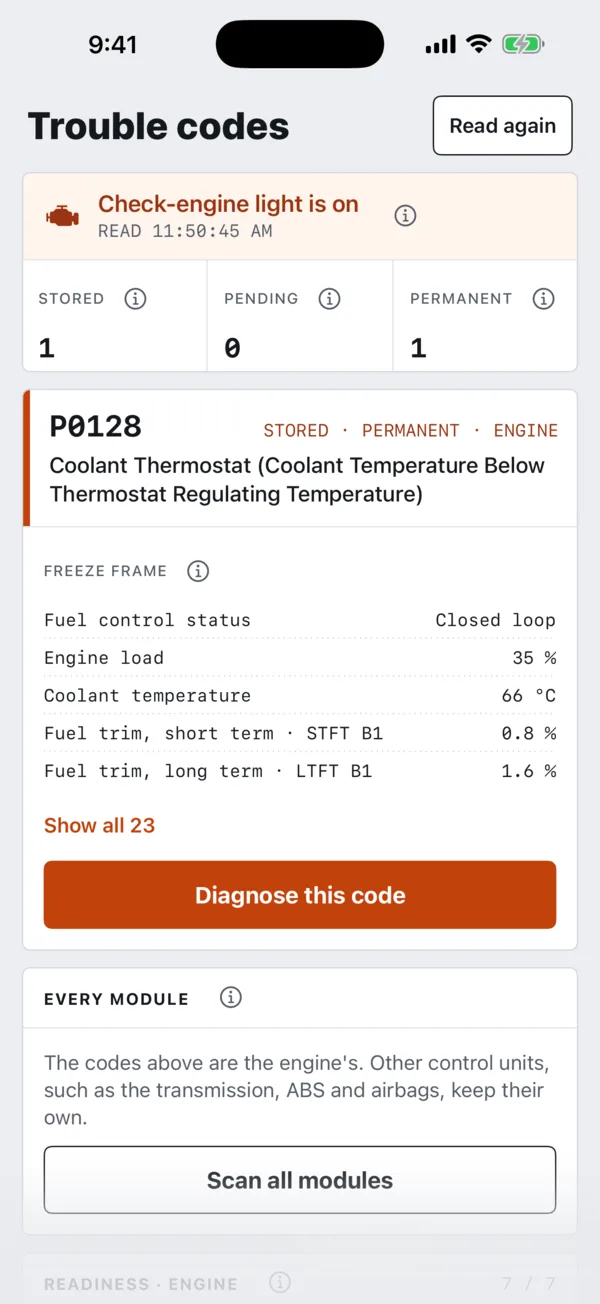
Trouble codes: P0128, coolant thermostat, stored in the engine, with its freeze frame.
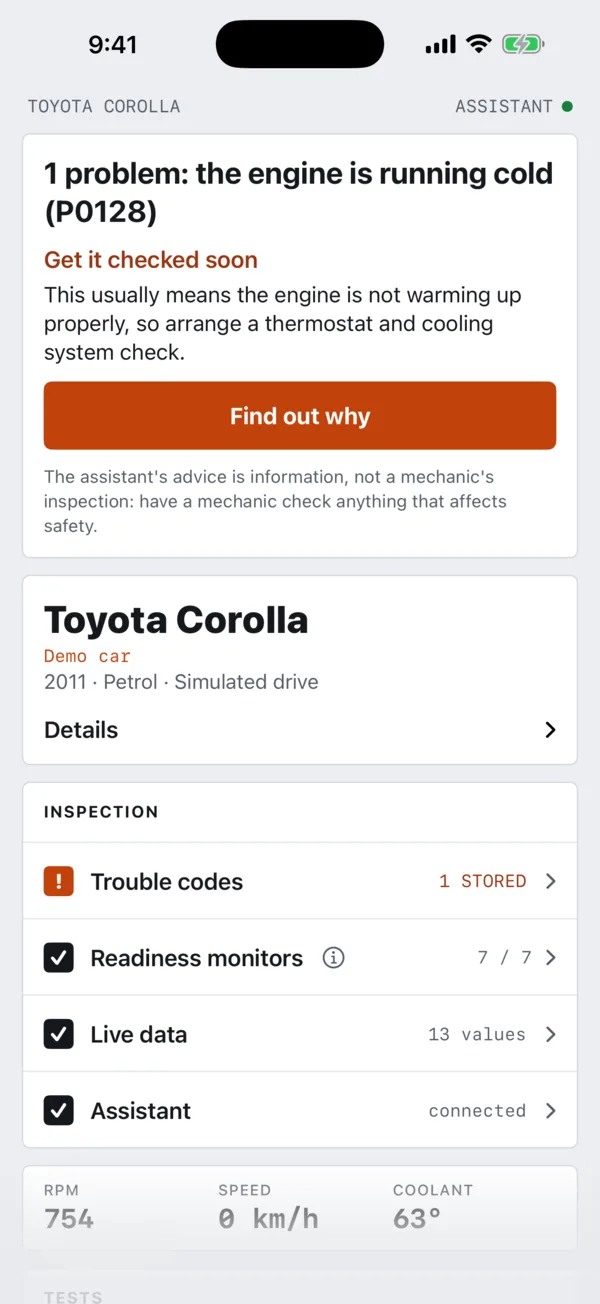
The Car tab for a Toyota Corolla: one problem, the engine running cold (P0128), with its trouble codes, readiness monitors 7 of 7, live data and the assistant connected.
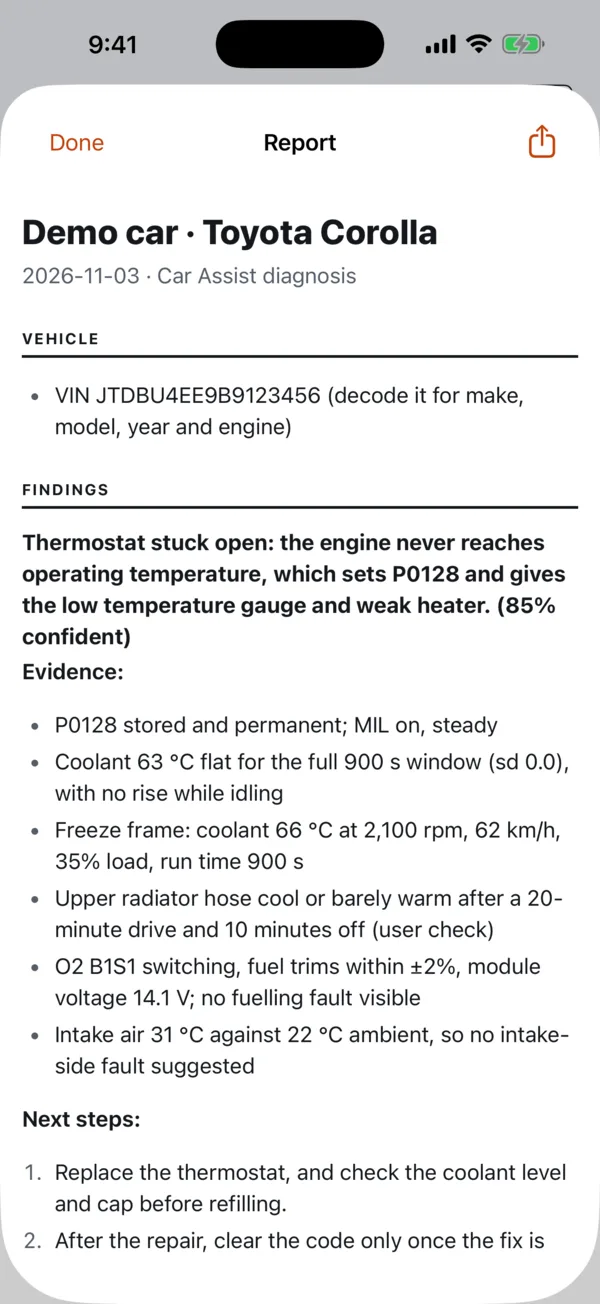
The report: a thermostat stuck open keeps the engine from warming up, 85% confident, with its evidence and next steps.
Adapter
Any ELM327, Bluetooth LE or Wi-Fi
Reads
Codes, freeze frames, readiness, live data
Modules
Every control unit that answers
Pricing
First diagnosis free, no subscription

How it works

Three steps from a warning light to a fix.

  1. 01

    Plug in the adapter

    It reads the car's fault codes, readiness and live data through the OBD port, and every control unit it can reach.

  2. 02

    Tell the assistant what's wrong

    It reads what it needs from the car, asks you to check things, and works out the likely cause.

  3. 03

    Get the fix

    Its findings, the fix, the parts and how hard the job is, as a report you can keep or share with your mechanic.

A diagnosis, not a code lookup

It works the problem like a good mechanic would.

A code says where the car noticed something. The assistant finds out why: it reads the freeze frame and live values, compares them with what you've noticed, asks you to check something at the car when the data can't tell, and says how sure it is.

  • Shows its evidence, so you can follow the reasoning.
  • Asks before any test that makes the car do something.
  • Writes up the fix, the parts and how hard the job is.
  • Remembers earlier sessions on the same car.
Diagnosis · Toyota Corolla 1.8 petrol P0128
Owner

“Temperature gauge stays low, heater is weak.”

Finding

The engine runs too cold, most likely because the thermostat is stuck open. A coolant sensor reading low is the main alternative.

70% confident

Evidence
  • P0128 stored and permanent, check-engine light on.
  • Coolant flat at 68 °C at idle; 66 °C at 62 km/h in the freeze frame.
  • Still low after 20 minutes on the highway, coolant full.
Check at the car

From a cold start, feel the upper radiator hose. Warm within a few minutes points to the thermostat; cool, then suddenly hot while the reading stays low, points to the sensor.

Fix

Replace the thermostat and refill the cooling system.

Moderate · thermostat and gasket, Toyota long-life coolant · work only on a cold engine
In the app

Everything your car reports, in one place.

Trouble codes

Stored, pending and permanent codes in plain English, with the freeze frame the car saved when each was set. Clear them when the job's done.

Every module

Beyond the engine: a scan of every control unit that answers, such as the transmission, ABS and airbags, depending on the car.

Live data

Watch RPM, coolant, fuel trims, sensor voltages and more as gauges and a graph. Every session keeps its readings for the timeline.

Readiness

See which emissions monitors have run, so you know whether the car's ready for an inspection.

Reports

Every diagnosis ends in a report with the findings, evidence, fix, parts and safety notes. Keep it, or send it to your mechanic.

Drive map

If you turn it on, see a drive on a map coloured by any reading, so you can spot where a fault shows up. Off unless you choose it.

Session timeline

Replay the drive, reading by reading.

Every reading in a session is kept in order. Go back to the moment the gauge dropped or the light came on, put the values that matter side by side, and see what every sensor said at that second.

  • Choose the charts: coolant against RPM and load, or anything else the car reported.
  • Every value at any moment, with how old each reading is.
  • Play it back at speed, or zoom in to a few seconds.
  • The assistant works from the same readings when it diagnoses.
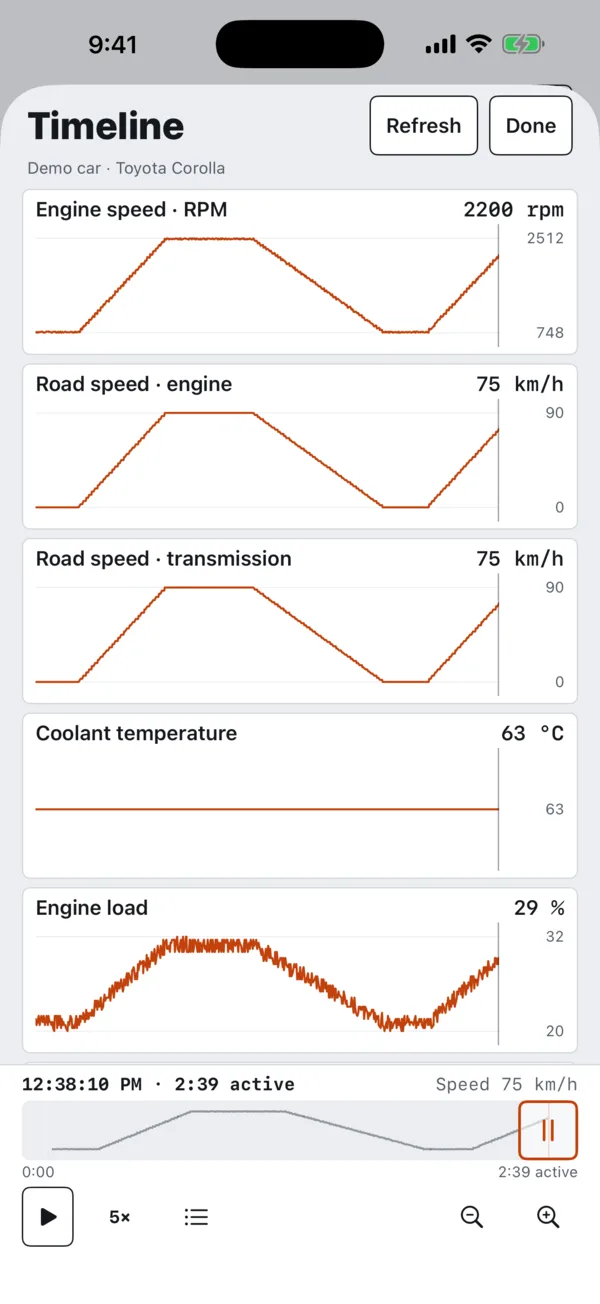
The session timeline: engine speed, road speed and engine load rise and fall through a drive while coolant stays flat at 63 °C.

Pricing

Pay for the diagnoses you run. Nothing else.

The app is free, and reading your car is free. Your first diagnosis is free too. After that you buy diagnoses in the app: one session with the assistant about a fault, however long it takes.

  • A diagnosis is the whole conversation about a fault, with no meter running.
  • Recording a drive and reading the car don't use one.
  • Your diagnoses don't expire.
DiagnosesPrice
1 diagnosisUS$4.99
3 diagnosesUS$11.99
10 diagnosesUS$29.99

Bought through the App Store, shown in your own currency in the app. No subscription.

The adapter

Need an adapter? Start with one of these.

Car Assist talks to the car through an ELM327 adapter on Bluetooth LE or Wi-Fi. These are well-known Bluetooth LE ones made for iPhone. Bluetooth is the easiest: the app finds the adapter by itself and keeps reading with the phone locked.

Veepeak OBDCheck BLE

Small and simple, Bluetooth LE, for iPhone and Android. A good first adapter.

View on Amazon

Vgate iCar Pro BLE

Bluetooth 4.0 (BLE), for iPhone and Android. Check the listing says BLE or 4.0: older iCar models are Bluetooth Classic.

View on Amazon

Vgate vLinker MC+

Bluetooth LE for iPhone, and works with Android and Windows too, if you'll use it with other software as well.

View on Amazon

Links go to Amazon Australia, where you'll see the price. As an Amazon Associate we earn from qualifying purchases. Any ELM327 adapter on Bluetooth LE or Wi-Fi works with the app.

Privacy

Your car's data stays yours.

You sign in with Apple, and we never see your name or email address. We don't sell your information or use it for advertising.

  • Location is off unless you turn on the drive map, and it's never sent to the AI.
  • Delete anything, a session or your whole account, from the app at any time.
  • Hosted in Australia, in Melbourne. The AI runs with Anthropic, only for diagnoses you start.

Questions

Before you start

Which adapter do I need?

Any OBD-II adapter built on the ELM327, on Bluetooth LE or Wi-Fi. iPhones can't use older “Bluetooth Classic” adapters, so check the listing says Bluetooth 4.0, BLE or iOS. Bluetooth is the easiest: the app finds the adapter and keeps reading with the phone locked. A few to start with.

Will it work with my car?

Most cars from the mid-2000s on have an OBD-II port, usually under the dashboard near the steering wheel. What each car reports varies; the engine is always there, and many cars answer for more modules. Check your car and adapter.

What does my trouble code mean?

Look up your code for its meaning, the app’s first verdict and what to check next. A code alone does not prove which part failed.

Can my workshop use it?

Car Assist Workshop lets a mechanic follow the cars their customers choose to share, from a Windows PC.

Does it replace a mechanic?

No. The assistant's findings are information to help you, not a mechanic's inspection, and it can be wrong. Have a qualified mechanic check anything that affects safety, such as brakes, steering, tyres or airbags, before you drive.

Do I need an internet connection?

Reading codes and live data works on the phone. The assistant runs online, so a diagnosis needs a connection.

Can I use it while driving?

Don't use the app while you're driving. Ask someone else, or pull over. It can keep recording with the phone in your pocket.

How do I get help?

Email support@obd.tools.